For the past several weeks, I’ve been dealing with significantly slow connections to and from my hosted services. Accessing files from my NAS felt like downloading them over a dial-up connection. Backups were hanging and failing after running for hours and barely making progress. My photo library service wasn’t even able to finish scanning all of my photos before failing due to timeouts. Something was wrong.
This had escalated to the point that it was driving me crazy. I had tried
everything I could think of to try to diagnose the slowness and improve the
situation. I migrated from CIFS to NFS for network shares, having seen that CIFS
can be slow when handling large numbers of small files. I migrated services
which had been running in LXC to dedicated VMs. Assuming network congestion may
be an issue, I reduced the amount of internal traffic my services generate by
scaling back the rate of backups and file scans. I replaced cables in my server
rack. Almost nothing helped (I say almost because the migration from CIFS -> NFS
actually did significantly reduce IO pressure in my main server  ).
).
At this point, I decided to start more deeply investigating the state of the network itself, having ruled out network congestion and service configuration as likely culprits. I installed a tool called iperf3 which measures maximum network bandwidth between hosts onto several hosts in my network. This yielded some interesting results:
- connections between servers are fast (gigabit ethernet)
- connections between server VM hosts on shared linux bridges (e.g. vmbr1) on the same server are SUPER FAST (10.9 Gbits/sec)
- connections between server VM hosts on different linux bridges (e.g. vmbr1 -> vmbr3) on the same server are fast (gigabit ethernet)
- connections to server VM hosts from outside server rack are slow (10-20 Mbits/sec)
- wifi has low bandwidth (1-4 Mbits/sec)
It was clear at this point that the slowdown seemed to be introduced when requests needed to enter or leave the server rack, as these connections were capped at 10-20 Mbits/sec while connections within the server rack were capped at the max rate for gigabit ethernet of around 943 Mbits/sec. I decided to take a closer look at the network configuration itself.
The intended ethernet route from my router to my server rack looks something like this:
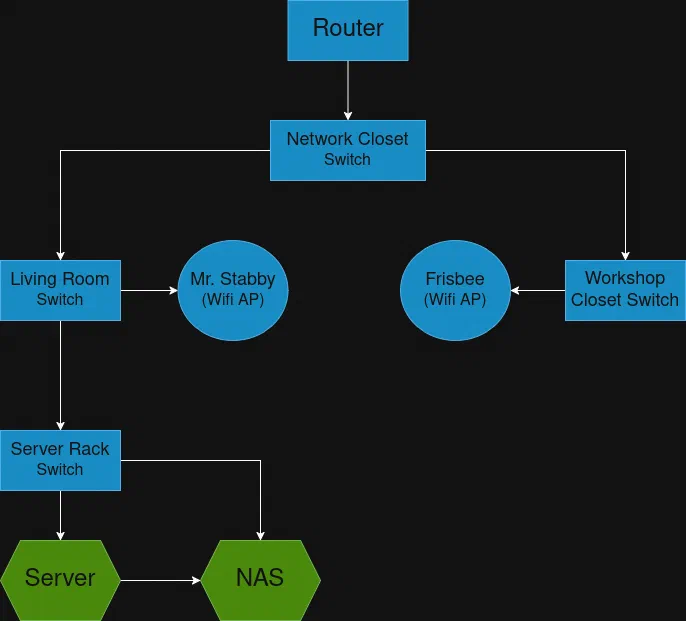
Ethernet is run from my router, to a network closet switch, then through my walls to my living room switch, then into my garage to the server rack switch, where my servers and NAS are connected.
Looking at the port configuration for my living room switch showed something unexpected:
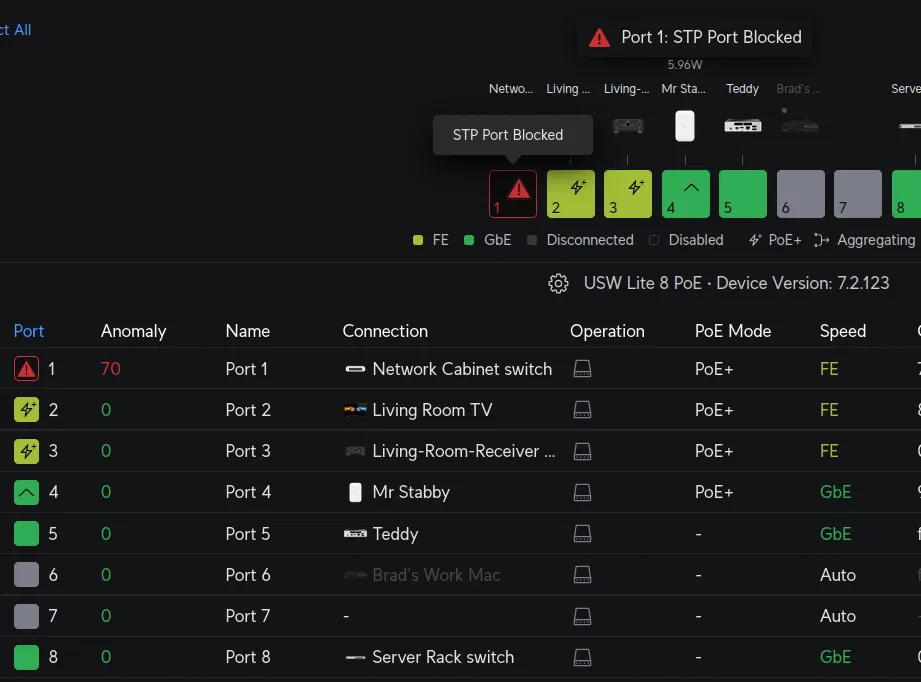
The switch port handling the ethernet connection between my network closet switch and living room switch had been disabled by the network due to a spanning tree protocol (STP) issue!
It turns out that around the time the slowness began, the living room switch had performed a factory reset and set its STP priority to a very large number (and thus low priority). This caused the network to configure the uplink for the living room switch to not be the ethernet connection to my network closet switch, but instead use the wireless access point Mr. Stabby which was meant to provide wifi to my living room, disabling the intended ethernet uplink as an STP loop!
In turn, Mr. Stabby was no longer receiving ethernet from the living room switch, but instead meshing with another access point named Frisbee, located across my house.
This resulted in my network route from my router to my server rack being configured something like this:
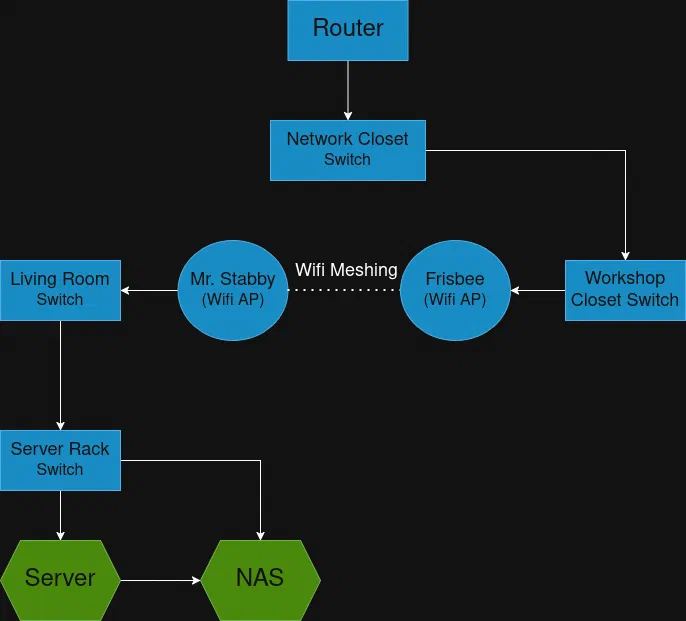
Instead of functioning as a wifi access point, Mr. Stabby had instead become a giant wifi dongle for my entire server rack! I would not have assumed this was possible.
Fixing the STP priority for my living room switch to the correct (lower) value allowed it to take priority over Mr. Stabby for STP, reconfiguring the network back to the intended layout, and finally fixed the network slowness issues and my sanity. :phew: